
HubSpot Integration Overview and Setup
The HubSpot integration connects your CRM to Measure so you can create contracts from associated deals without leaving HubSpot. Before configuring field mappings, you need to connect your HubSpot account. In Integrations, click Install to add the integration to your workspace, then authorize the connection. View the full installation walk-through here.
Select your Action Mapping
Action mapping determines which events in HubSpot and Measure trigger a sync, and that decides which fields actually need to be mapped. Configure action mapping first, then review the field mappings underneath it. Action mapping is for updating Contacts <> Customers in HubSpot and Deals <> Contracts bidirectionally. There is one exception where customer fields map automatically without action mapping configured.
HubSpot to Measure
Contact <> Customer
When a contact is added: Create a customer in Measure.
When a contact is updated: Update the customer in Measure
Deal <> Customer
When a deal is created: Create a customer in Measure
When a deal is updated: Update the customer in Measure
Measure to HubSpot
Customer <> Contact
When a customer is created: Create a contact in HubSpot.
When a customer is updated: Update the contact in HubSpot.
Contract <> Deal
When a contract is updated: Update the deal in HubSpot
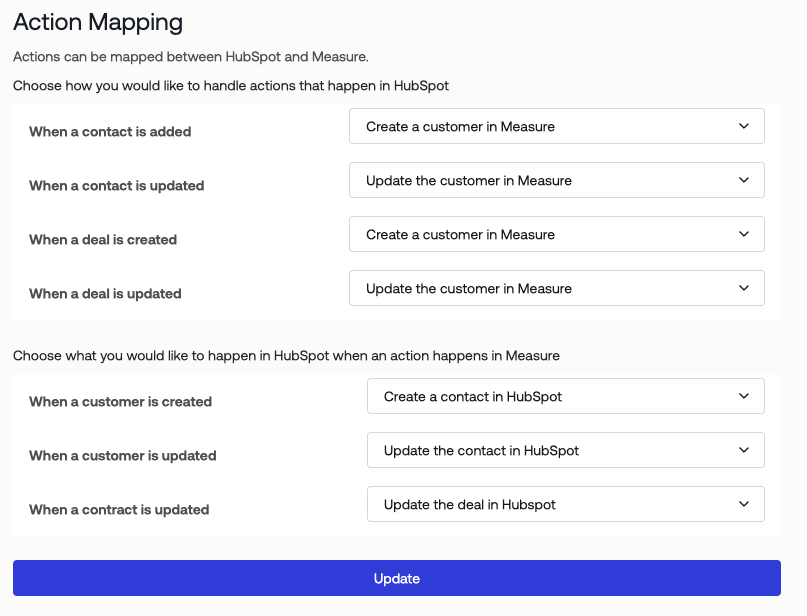
These actions keep contacts and customers aligned in both directions. Set any action to Do Nothing if you want a one-way sync.
Select your Customer Field Mapping
Customer mapping is less common. Many teams prefer to keep HubSpot as the source of truth for contact data and do not want updates in Measure flowing back to HubSpot. If that applies to your team, set the Customer <> Contact action mapping to Do Nothing under the Measure to HubSpot section above.
The Customer to HubSpot Contact mapping covers the same fields you would fill in when creating a customer manually in Measure. The HubSpot contact properties available in the dropdown depend on what exists in your HubSpot account, including any custom properties your team has added. Nothing pre-populates. You decide which Measure customer field flows into each HubSpot field.
Automatic Customer Creation From Deals
When a contract is created from an associated deal in HubSpot and no matching customer exists in Measure yet, Measure automatically creates the customer. In this case, core contact fields are pulled from the HubSpot contact regardless of your action mapping settings. The following fields are mapped automatically: Contact Name, Email, Billing Emails, Title, Organization, Phone Number, and Address.
For example, if your team sets Customer <> Contact action mapping to Do Nothing but creates a contract from a HubSpot deal, Measure still creates the customer record using those core fields. You do not need to configure customer field mapping for this to work.
Common fields teams map:
HubSpot Field | Measure Field |
Street Address | Address |
Annual Revenue | ARR |
City | Address City |
Company Name | Organization Name |
Country/Region | Address Country |
First Name | First Name |
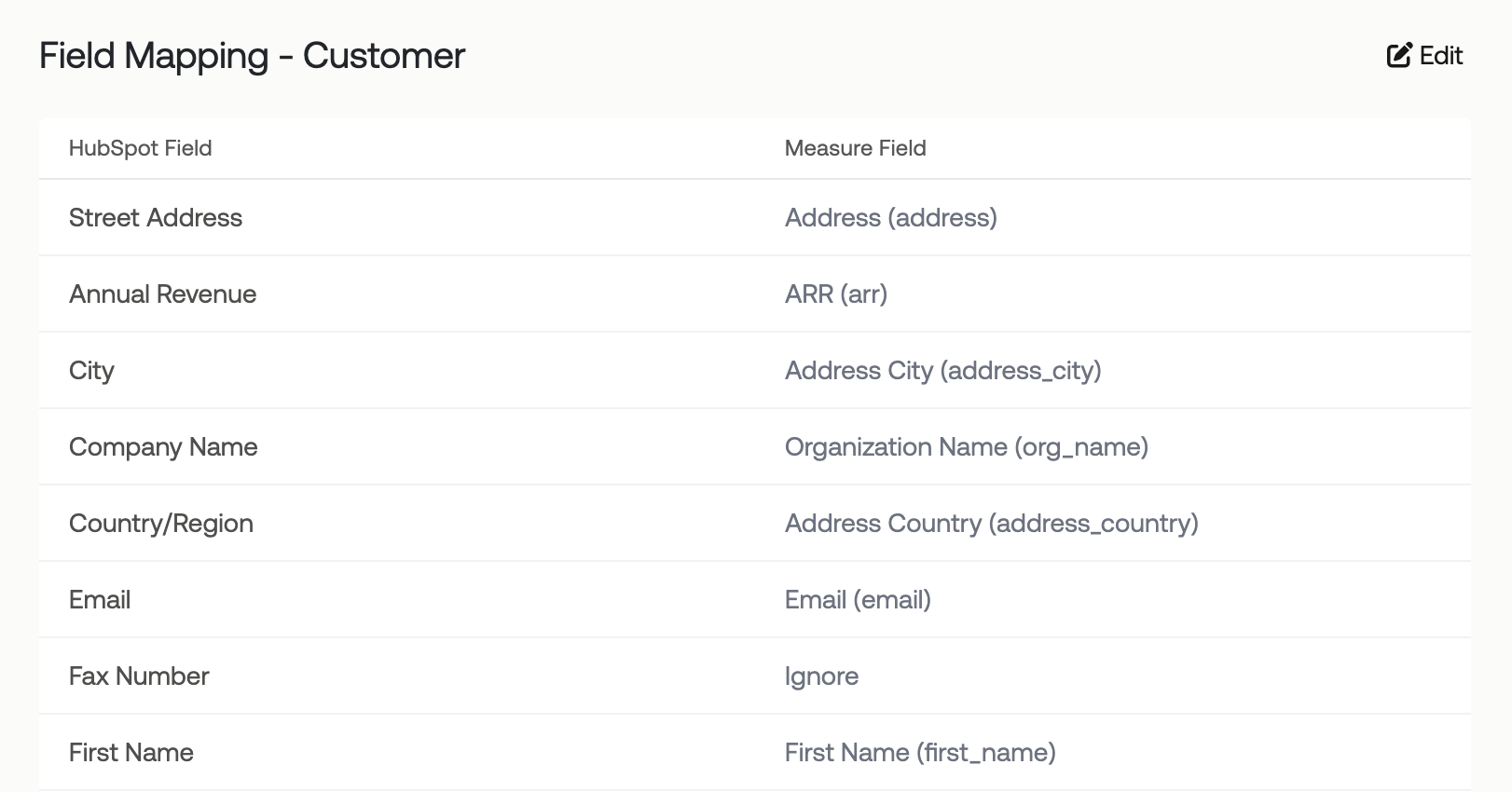
Map only the fields your team relies on inside Measure. Leave the rest unmapped if they are not necessary.
Select your Contract Field Mapping
The Contract to HubSpot Deal mapping keeps deal records in sync with Measure contracts. As with customer mapping, the HubSpot deal properties available depend on your HubSpot account.
The mapping that ships with meaningful defaults is Deal Stage → Status, which controls how Measure contract statuses translate to HubSpot pipeline stages. The pipeline itself is auto-computed. Measure sets it for you.
Common fields teams map:
HubSpot Field | Measure Field |
Amount | TCV (Total Contract Value) |
Create Date | Created Date |
Currency | Currency |
Deal Name (Required) | Title |
Deal Stage (Required) | Status |
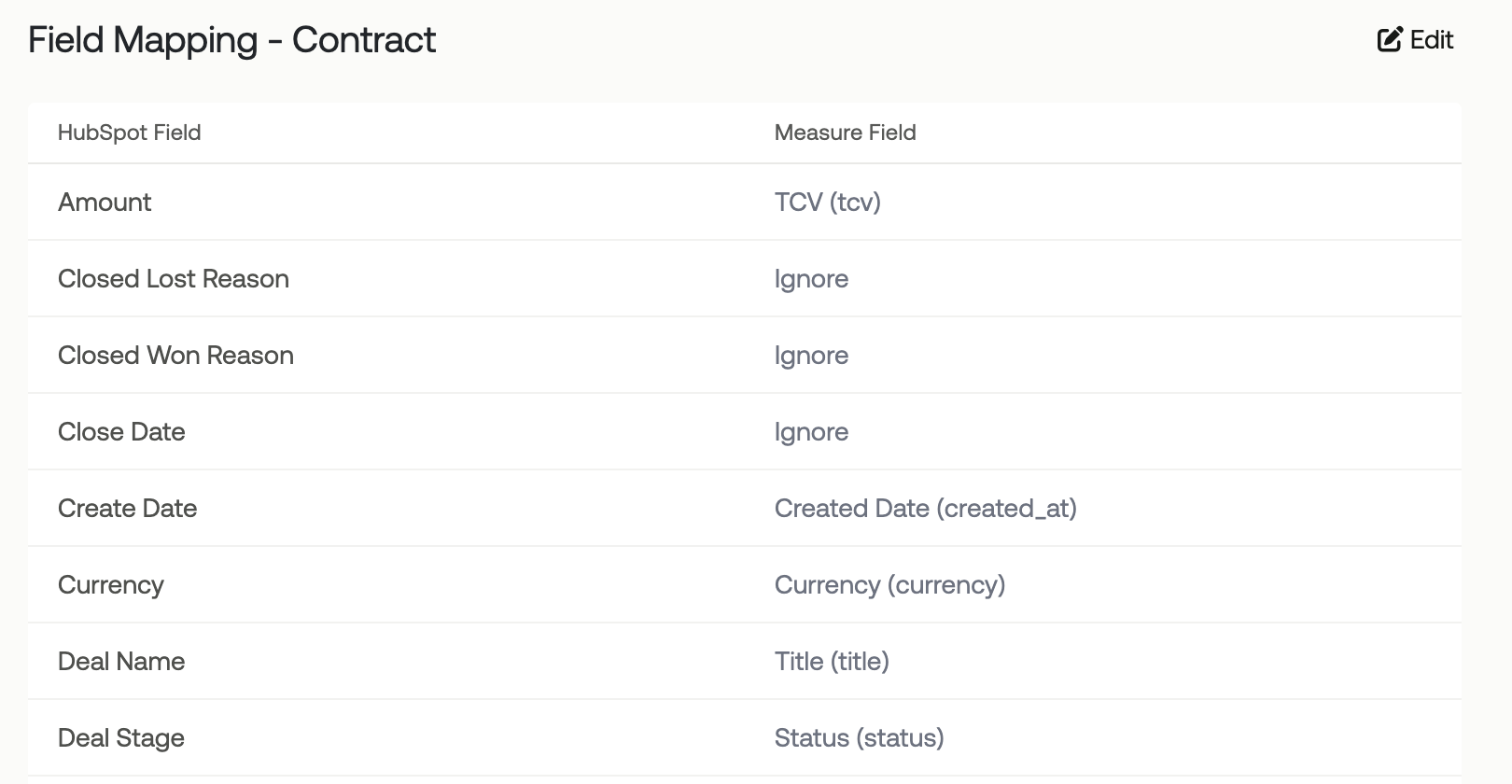
Map additional deal fields like Close Date, Create Date and others only if you need that data to round-trip.
Deal Stage Defaults
Deal Stage is the one mapping that almost always needs review. Measure contract statuses map to HubSpot sales pipeline stages, and HubSpot pipelines vary by team. The defaults point to HubSpot's standard Sales Pipeline stages:
HubSpot Deal Stage | Measure Contract Status |
Appointment Scheduled |
|
Appointment Scheduled |
|
Contract Sent |
|
Contract Sent |
|
Contract Sent |
|
Contract Sent |
|
Closed Won |
|
Closed Won |
|
Closed Lost |
|
Closed Lost |
|
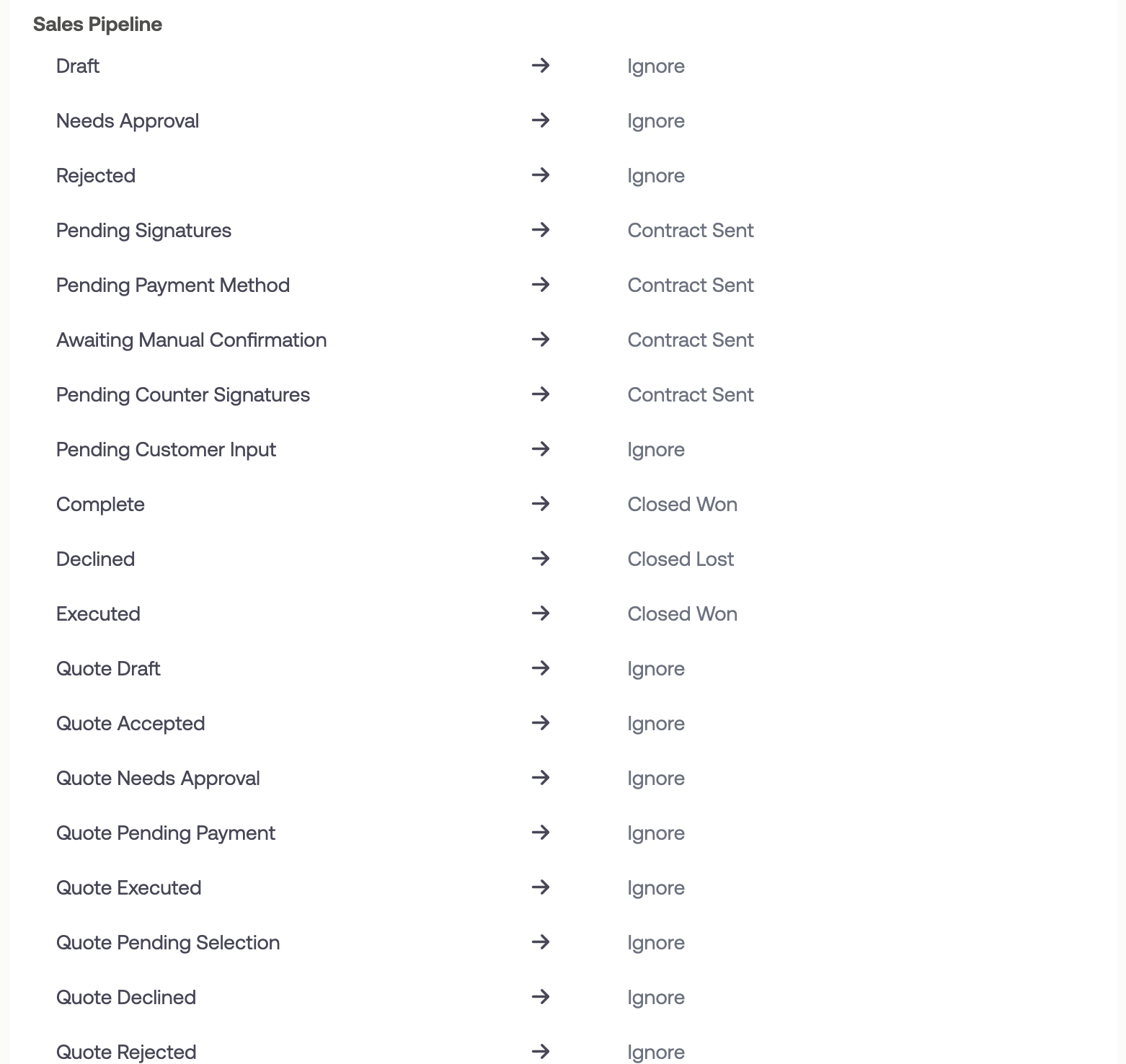
If your team uses a custom pipeline, remap the statuses that matter for your workflow. You do not need to remap every status. Only the ones your pipeline actually uses. Statuses that never get triggered will not cause sync issues if they are left on the default.
What You Actually Need to Configure
Most fields do not need your attention. Focus your setup time on:
Action mappings to determine what you want synced over, and if the sync will be bi-directional.
Deal Name, Deal Stage Field Mapping for the statuses your pipeline actually uses. ⚠️ These are required fields for the sync to work.
Any deal fields your team relies on inside Measure, including custom HubSpot properties that you want synced over for a deal/contract.
Review your Integration Logs on the HubSpot Integration page after the first few syncs to confirm everything is flowing as expected.
Creating Contracts from HubSpot
You can create Measure contracts directly from a HubSpot deal page. When you open a deal in HubSpot, you see a Measure contracts section that shows any existing contracts attached to that deal.
Click to create a new contract. Measure preloads the customer information and deal name. Select the pricing plan, and Measure creates the contract. The contract details appear immediately on the HubSpot deal page.
As you finalize the contract in Measure, send it to the customer, and the customer reviews and signs it, the contract status updates in HubSpot in real time. When the contract is fully executed, the deal moves to Closed Won.
Settings
The HubSpot integration includes additional settings to control sync behavior.
Automatically create unknown pricing in Measure
When enabled, if a HubSpot deal references a product or pricing that does not exist in Measure, Measure will automatically create it. When disabled, the sync will skip deals with unknown pricing.
Primary Action on Deal Card
Choose what action appears as the primary button on the Measure card within HubSpot deal pages. Options typically include Create Contract or View Contracts.
De-dupe customer based on property
Choose which field Measure uses to identify duplicate customers. Common options include email or a custom unique identifier. When set to Don't de-duplicate, Measure treats each contact as a separate customer even if email addresses match.
Troubleshooting
Sync Failing for a Contract
Check the Integration Logs first. Each entry shows whether a push or pull succeeded or failed, along with error details that point to the specific field causing the problem.
Unmapped or invalid deal stage is a common cause. The log will surface this directly. Revisit the Contract → Deal field mapping and confirm every contract status has a corresponding HubSpot stage assigned.
Deal Stage Not Populating
The Measure contract status was not mapped to a HubSpot deal stage in the sub-dropdown. Revisit the Contract → Deal field mapping and confirm every contract status has a corresponding HubSpot stage assigned.
Wrong Data in a HubSpot Field
A Measure field was mapped to an incompatible HubSpot field type. For example, a text field mapped to a numeric field like Deal Value. Re-map using a compatible field type.
HubSpot Contact Not Created from a Deal
The sync only creates a Measure customer from a deal if the deal has a linked HubSpot Contact and that contact does not already exist in Measure. Confirm the HubSpot deal has an associated Contact record before expecting a customer to be created.
Using Integration Logs
Logs are your first stop for any sync issue. For every data push or pull attempt, the log records:
Whether the sync succeeded or failed.
The object involved (customer, contract, contact, deal).
Error details when a failure occurs.
Always check the log error message before adjusting configuration. It will typically point directly to the field or mapping that needs attention.