
Sales Commissions
What Sales Commissions Does
Sales Commissions in Measure automates the calculation and tracking of commissions for your sales team. It connects directly to your contracts and invoices, so commissions are calculated from the same data that drives your billing.
You define commission plans for each sales team member, configure quota and reporting periods in settings, and view attainment and earned commissions from the Commissions dashboard.
Commission Settings
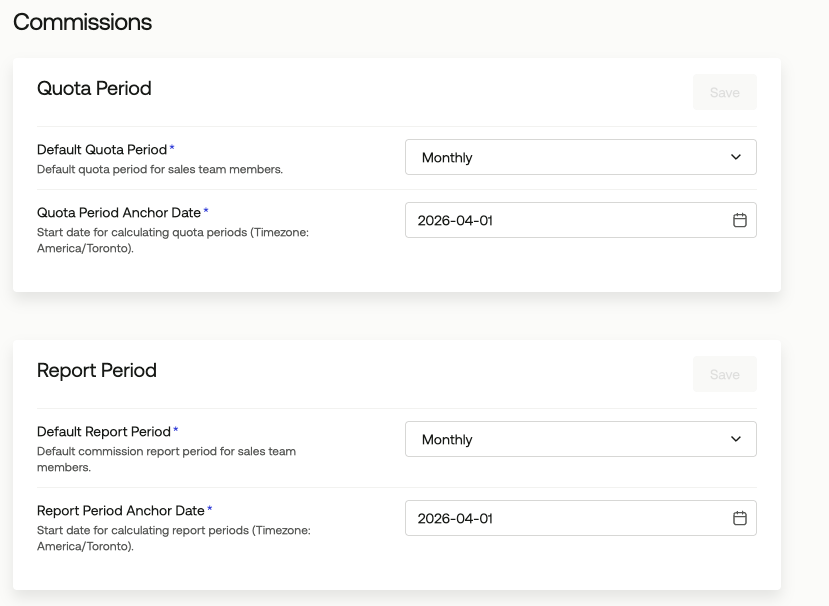
Commission Settings control the default periods used across your team's commission calculations. You configure these under Settings > Commissions.
The Quota Period defines how frequently the quota resets for your sales team. The Quota Period Anchor Date sets the start date for those calculations. Setting an anchor date of the first of a month with a monthly quota period means each quota period runs month-over-month from that date.
The Report Period controls the default window used for commission reports. Like quota periods, report periods have an anchor date and cadence. Both settings respect the timezone configured for your workspace.
Commission Plans
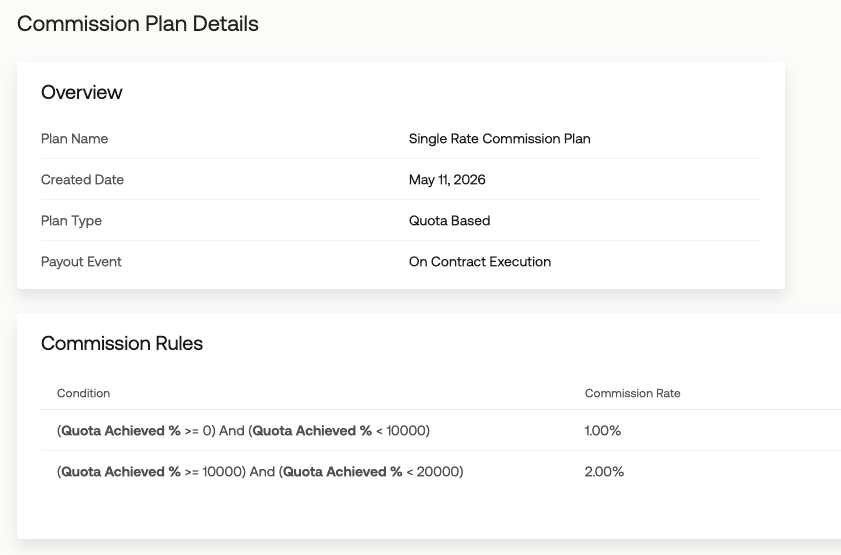
A Commission Plan defines the rules for calculating how much a sales team member earns on a deal. Each plan has a name, a payout event, a commission base, and one or more commission rules tied to quota achievement tiers.
Measure includes five plan templates to start from:
Single Rate Commission: Pays the same commission rate on all deals regardless of quota achievement.
Tiered Commission: Pays a higher commission rate after a certain level of quota achievement is reached.
Multi-tiered Commission: Pays a lower rate at low quota achievement and a higher rate at high quota achievement.
Tiered Commission With Cap: Pays 0% commission after a defined quota achievement threshold.
Single Rate Commission With Contract Length Multiplier: Applies rate multipliers to a single-rate plan based on contract duration.
You can customize any template after selecting it, including the plan name, tier thresholds, rates, and optional accelerators or clawbacks.
Commission Events
When a commission plan is assigned to a sales team member, Measure monitors for qualifying deals. Each time a deal closes and the conditions in the assigned plan are met, Measure creates a commission event. Each event captures the triggering criteria, the commission plan applied, and the resulting commission amount.
Payout Events and Commission Base
The Payout Event determines when a commission is recognized. Measure supports three options: On Contract Executed, On First Invoice Paid, and On Invoice Payment.
The Commission Base determines the value to which the commission rate is applied. Contract ACV uses the annual contract value, while Contract TCV uses the total contract value. The right choice depends on how your team measures deal size and structures compensation.
Accelerators and Clawbacks
Accelerators are optional modifiers that increase the commission rate when specific conditions are met. Measure supports two accelerator types: additive and multiplicative.
An additive accelerator adds a flat rate on top of the base commission. A multiplicative accelerator applies a multiplier to the base rate when a condition is met. For example, you can set a 1.5x multiplier that applies when a contract exceeds two years, rewarding longer-term deals with a higher payout.
Clawbacks are optional rules that reduce or reverse a commission after it has been earned. You define a clawback percentage, whether it affects quota, and the condition that triggers it. Clawbacks are useful for scenarios like early contract cancellation or payment default.
The Commissions Dashboard
The Commissions dashboard gives your team a real-time view of performance for the current quota and report period. It shows total quota achieved, team attainment as an average percentage, commissions earned, and days remaining in the current period.
The periods shown on the dashboard are driven by the anchor dates you configure in Commission Settings. Historical quota and report periods are also available for reviewing past performance.
Commission reports are available under Commissions > Reports. Each report covers a commissionable period and shows a breakdown by sales member and commission event. At the end of a report period, you can approve the report and export it for your HR or finance team to process payouts.